> ## Documentation Index
> Fetch the complete documentation index at: https://docs-staging-feat-update-styling-docs-for-universal-compone.mintlify.site/llms.txt
> Use this file to discover all available pages before exploring further.

> Configure an update policy form using Forms for Actions

# Use Cases: Configure an update policy form using Forms

<Card title="Before you start">
  1. Create a [Machine-to-Machine Application](/docs/get-started/auth0-overview/create-applications/machine-to-machine-apps) with the following scopes enabled:

  * `read:users`
  * `update:users`
  * `create:users`
  * `read:users_app_metadata`
  * `update:users_app_metadata`
  * `create:users_app_metadata`

  2. Add a [Vault connection](/docs/customize/forms/vault) using the M2M application credentials.
</Card>

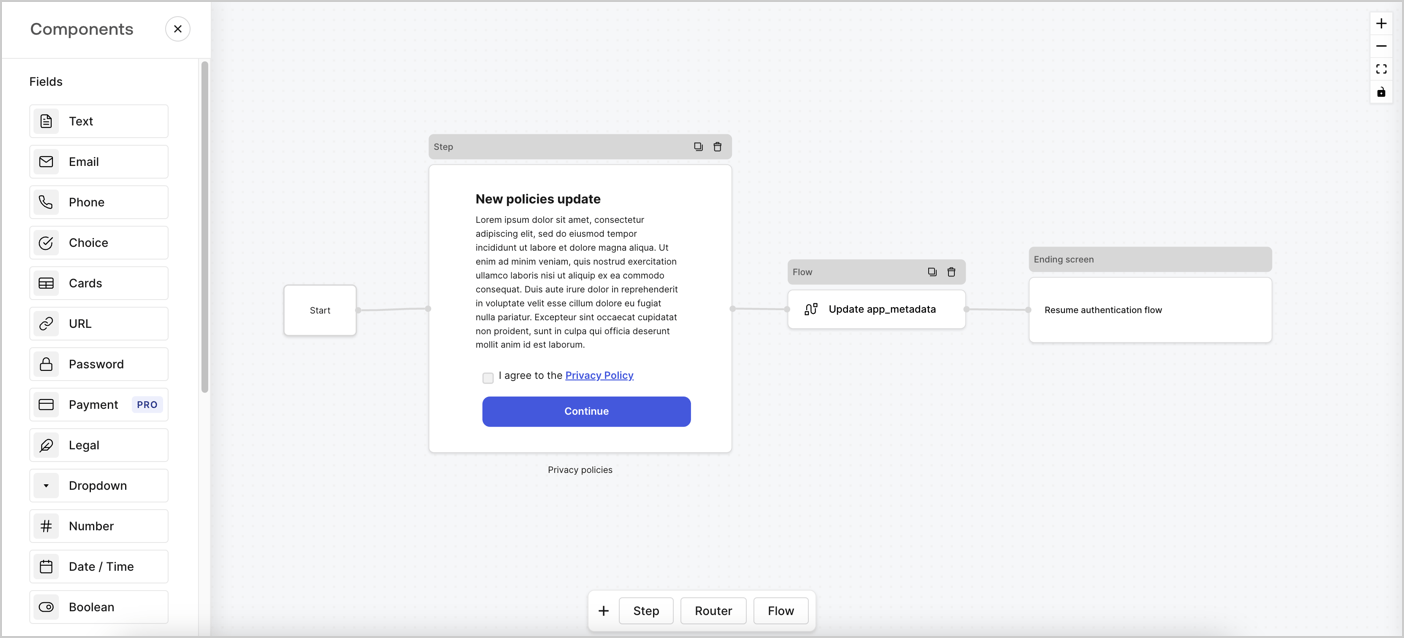
Forms for Actions allows you to create custom privacy policies flows and store the consent under the `app_metadata` object.
<Frame>
  <img src="https://mintcdn.com/docs-staging-feat-update-styling-docs-for-universal-compone/CHwbi8BEn2axWgua/docs/images/cdy7uua7fh8z/6i68dMvHDTijfRmSgN1x8Q/ad900e7d4c0fb34645921435472b8684/privavy-policy-form.png?fit=max&auto=format&n=CHwbi8BEn2axWgua&q=85&s=2421c15abd9c21a223e1dfe3f21d69ac" alt="Dashboard > Actions > Forms > Privacy policy use case" data-og-width="1404" width="1404" data-og-height="638" height="638" data-path="docs/images/cdy7uua7fh8z/6i68dMvHDTijfRmSgN1x8Q/ad900e7d4c0fb34645921435472b8684/privavy-policy-form.png" data-optimize="true" data-opv="3" srcset="https://mintcdn.com/docs-staging-feat-update-styling-docs-for-universal-compone/CHwbi8BEn2axWgua/docs/images/cdy7uua7fh8z/6i68dMvHDTijfRmSgN1x8Q/ad900e7d4c0fb34645921435472b8684/privavy-policy-form.png?w=280&fit=max&auto=format&n=CHwbi8BEn2axWgua&q=85&s=bd54525f74fa66bf82b2b65804b3487c 280w, https://mintcdn.com/docs-staging-feat-update-styling-docs-for-universal-compone/CHwbi8BEn2axWgua/docs/images/cdy7uua7fh8z/6i68dMvHDTijfRmSgN1x8Q/ad900e7d4c0fb34645921435472b8684/privavy-policy-form.png?w=560&fit=max&auto=format&n=CHwbi8BEn2axWgua&q=85&s=b8d17efaf9eff168729539d55f7a5ab8 560w, https://mintcdn.com/docs-staging-feat-update-styling-docs-for-universal-compone/CHwbi8BEn2axWgua/docs/images/cdy7uua7fh8z/6i68dMvHDTijfRmSgN1x8Q/ad900e7d4c0fb34645921435472b8684/privavy-policy-form.png?w=840&fit=max&auto=format&n=CHwbi8BEn2axWgua&q=85&s=ca782c62625f23adffc27439dc55c927 840w, https://mintcdn.com/docs-staging-feat-update-styling-docs-for-universal-compone/CHwbi8BEn2axWgua/docs/images/cdy7uua7fh8z/6i68dMvHDTijfRmSgN1x8Q/ad900e7d4c0fb34645921435472b8684/privavy-policy-form.png?w=1100&fit=max&auto=format&n=CHwbi8BEn2axWgua&q=85&s=2cf1c3dd893fc0a9db163e21f2ff8764 1100w, https://mintcdn.com/docs-staging-feat-update-styling-docs-for-universal-compone/CHwbi8BEn2axWgua/docs/images/cdy7uua7fh8z/6i68dMvHDTijfRmSgN1x8Q/ad900e7d4c0fb34645921435472b8684/privavy-policy-form.png?w=1650&fit=max&auto=format&n=CHwbi8BEn2axWgua&q=85&s=e8c2fbf66c34714d8e1b0c0a3929c2ef 1650w, https://mintcdn.com/docs-staging-feat-update-styling-docs-for-universal-compone/CHwbi8BEn2axWgua/docs/images/cdy7uua7fh8z/6i68dMvHDTijfRmSgN1x8Q/ad900e7d4c0fb34645921435472b8684/privavy-policy-form.png?w=2500&fit=max&auto=format&n=CHwbi8BEn2axWgua&q=85&s=cf6ac051cde75f33df72aa82fec7428e 2500w" />
</Frame>

The sections below outline how you can create an Update Policy form using nodes and flows, along with steps for adding your form to a [Post Login](/docs/customize/actions/explore-triggers/signup-and-login-triggers/login-trigger) Action.

## Create a form from scratch

Follow these steps to create a form to gather information:

1. Open the Form editor by selecting **Auth0 Dashboard > Actions > Forms.**
2. Select **Create Form** > **Start from scratch**.

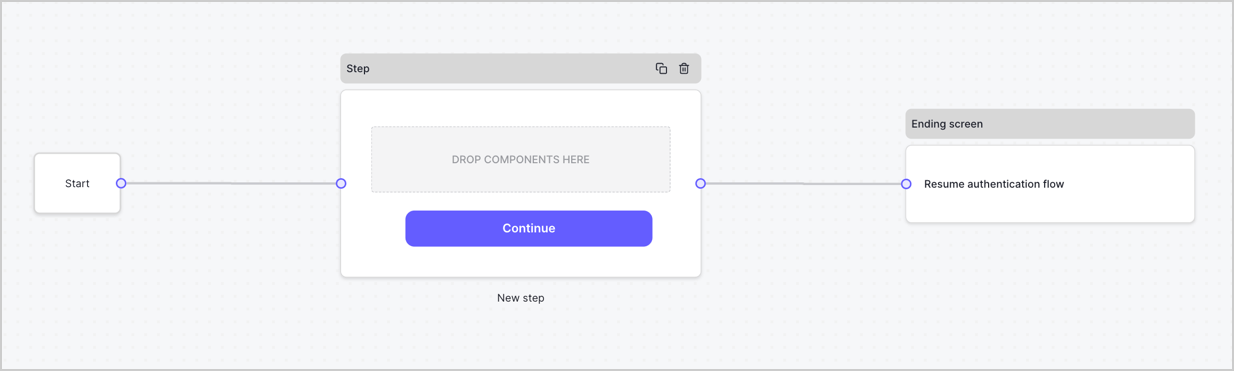
By default, a new form contains a Start node, a Step node, and an Ending screen node.
<Frame>
  <img src="https://mintcdn.com/docs-staging-feat-update-styling-docs-for-universal-compone/OirAsOnZ0fSqyxqR/docs/images/cdy7uua7fh8z/2TZ9jSjgEcARFpULI6hz4R/a4319a1bd482f2ee5cc23100fdb2f42c/New-form-Forms-for-action-use-case.png?fit=max&auto=format&n=OirAsOnZ0fSqyxqR&q=85&s=b1ff1cba6d937a0c9f05660a06595d58" alt="Dashboard > Forms > Use Cases > Form" data-og-width="1234" width="1234" data-og-height="371" height="371" data-path="docs/images/cdy7uua7fh8z/2TZ9jSjgEcARFpULI6hz4R/a4319a1bd482f2ee5cc23100fdb2f42c/New-form-Forms-for-action-use-case.png" data-optimize="true" data-opv="3" srcset="https://mintcdn.com/docs-staging-feat-update-styling-docs-for-universal-compone/OirAsOnZ0fSqyxqR/docs/images/cdy7uua7fh8z/2TZ9jSjgEcARFpULI6hz4R/a4319a1bd482f2ee5cc23100fdb2f42c/New-form-Forms-for-action-use-case.png?w=280&fit=max&auto=format&n=OirAsOnZ0fSqyxqR&q=85&s=5400ff41ee27d1cb9381bc8ef48fbbec 280w, https://mintcdn.com/docs-staging-feat-update-styling-docs-for-universal-compone/OirAsOnZ0fSqyxqR/docs/images/cdy7uua7fh8z/2TZ9jSjgEcARFpULI6hz4R/a4319a1bd482f2ee5cc23100fdb2f42c/New-form-Forms-for-action-use-case.png?w=560&fit=max&auto=format&n=OirAsOnZ0fSqyxqR&q=85&s=8ffc63f1181a631510b21a878876b99b 560w, https://mintcdn.com/docs-staging-feat-update-styling-docs-for-universal-compone/OirAsOnZ0fSqyxqR/docs/images/cdy7uua7fh8z/2TZ9jSjgEcARFpULI6hz4R/a4319a1bd482f2ee5cc23100fdb2f42c/New-form-Forms-for-action-use-case.png?w=840&fit=max&auto=format&n=OirAsOnZ0fSqyxqR&q=85&s=27e8f0b486e5fcd40151e37d0e38b01d 840w, https://mintcdn.com/docs-staging-feat-update-styling-docs-for-universal-compone/OirAsOnZ0fSqyxqR/docs/images/cdy7uua7fh8z/2TZ9jSjgEcARFpULI6hz4R/a4319a1bd482f2ee5cc23100fdb2f42c/New-form-Forms-for-action-use-case.png?w=1100&fit=max&auto=format&n=OirAsOnZ0fSqyxqR&q=85&s=981169e0711b29086c3fe7e32762340f 1100w, https://mintcdn.com/docs-staging-feat-update-styling-docs-for-universal-compone/OirAsOnZ0fSqyxqR/docs/images/cdy7uua7fh8z/2TZ9jSjgEcARFpULI6hz4R/a4319a1bd482f2ee5cc23100fdb2f42c/New-form-Forms-for-action-use-case.png?w=1650&fit=max&auto=format&n=OirAsOnZ0fSqyxqR&q=85&s=6904752afb572187008f1cf934c796a5 1650w, https://mintcdn.com/docs-staging-feat-update-styling-docs-for-universal-compone/OirAsOnZ0fSqyxqR/docs/images/cdy7uua7fh8z/2TZ9jSjgEcARFpULI6hz4R/a4319a1bd482f2ee5cc23100fdb2f42c/New-form-Forms-for-action-use-case.png?w=2500&fit=max&auto=format&n=OirAsOnZ0fSqyxqR&q=85&s=736084bf82b392642aca02c3c5c1f1b9 2500w" />
</Frame>

### Configure the Step node

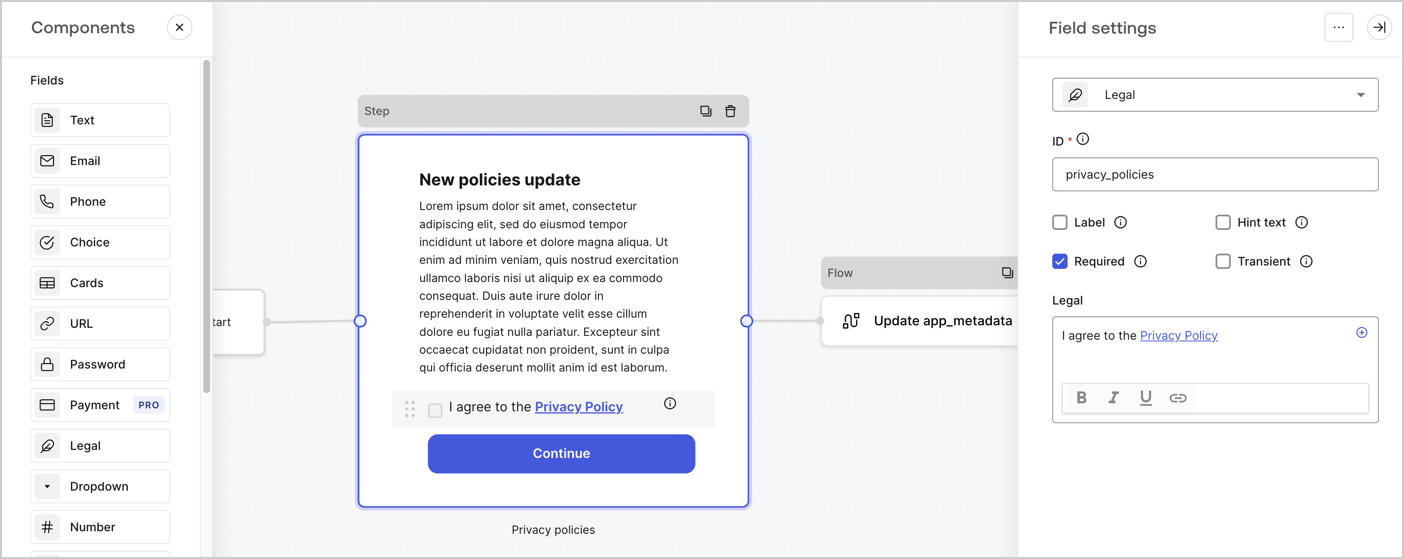
The Step node is the graphical interface visible to users. Add [Fields](/docs/customize/forms/nodes-and-components) to the Step node to collect the new agreement acceptance value by following these steps:

1. Drag a **Rich text** field from the **Components menu** into the **Step** node.

   * **Rich text**: Enter a description of your privacy policies updates.
   * Select **Save**.
2. Drag a **Legal** field into the **Step** node.

   * **ID**: Enter `privacy_policies`.
   * **Required**: Enable the checkbox.
   * **Legal**: Enter `I agree to the Privacy Policy`.
   * Select **Save**.
3. Select **Publish** to save.
<Frame>
  <img src="https://mintcdn.com/docs-staging-feat-update-styling-docs-for-universal-compone/MQMAGwjDlzN1zbBM/docs/images/cdy7uua7fh8z/59zFFjQjAnjogkc2QGIqqJ/0ad66b1b636544122aa4e65968b76c2c/privacy-policy-step-node.png?fit=max&auto=format&n=MQMAGwjDlzN1zbBM&q=85&s=cb9b14efa0947774009330bff8d88810" alt="Dashboard > Actions > Forms > Use case privacy policy step node" data-og-width="1404" width="1404" data-og-height="559" height="559" data-path="docs/images/cdy7uua7fh8z/59zFFjQjAnjogkc2QGIqqJ/0ad66b1b636544122aa4e65968b76c2c/privacy-policy-step-node.png" data-optimize="true" data-opv="3" srcset="https://mintcdn.com/docs-staging-feat-update-styling-docs-for-universal-compone/MQMAGwjDlzN1zbBM/docs/images/cdy7uua7fh8z/59zFFjQjAnjogkc2QGIqqJ/0ad66b1b636544122aa4e65968b76c2c/privacy-policy-step-node.png?w=280&fit=max&auto=format&n=MQMAGwjDlzN1zbBM&q=85&s=8398679132b6602df8e353ce8c20df71 280w, https://mintcdn.com/docs-staging-feat-update-styling-docs-for-universal-compone/MQMAGwjDlzN1zbBM/docs/images/cdy7uua7fh8z/59zFFjQjAnjogkc2QGIqqJ/0ad66b1b636544122aa4e65968b76c2c/privacy-policy-step-node.png?w=560&fit=max&auto=format&n=MQMAGwjDlzN1zbBM&q=85&s=1f3facedd37fe422878bd127658cb368 560w, https://mintcdn.com/docs-staging-feat-update-styling-docs-for-universal-compone/MQMAGwjDlzN1zbBM/docs/images/cdy7uua7fh8z/59zFFjQjAnjogkc2QGIqqJ/0ad66b1b636544122aa4e65968b76c2c/privacy-policy-step-node.png?w=840&fit=max&auto=format&n=MQMAGwjDlzN1zbBM&q=85&s=33d873cb3811ae97b0a242bfb2dff7f0 840w, https://mintcdn.com/docs-staging-feat-update-styling-docs-for-universal-compone/MQMAGwjDlzN1zbBM/docs/images/cdy7uua7fh8z/59zFFjQjAnjogkc2QGIqqJ/0ad66b1b636544122aa4e65968b76c2c/privacy-policy-step-node.png?w=1100&fit=max&auto=format&n=MQMAGwjDlzN1zbBM&q=85&s=d373159b35ba6f95d49a9a7c2934f656 1100w, https://mintcdn.com/docs-staging-feat-update-styling-docs-for-universal-compone/MQMAGwjDlzN1zbBM/docs/images/cdy7uua7fh8z/59zFFjQjAnjogkc2QGIqqJ/0ad66b1b636544122aa4e65968b76c2c/privacy-policy-step-node.png?w=1650&fit=max&auto=format&n=MQMAGwjDlzN1zbBM&q=85&s=15e6a27bf104fece28dc707f6801be01 1650w, https://mintcdn.com/docs-staging-feat-update-styling-docs-for-universal-compone/MQMAGwjDlzN1zbBM/docs/images/cdy7uua7fh8z/59zFFjQjAnjogkc2QGIqqJ/0ad66b1b636544122aa4e65968b76c2c/privacy-policy-step-node.png?w=2500&fit=max&auto=format&n=MQMAGwjDlzN1zbBM&q=85&s=5eeef482377ee0b9048c5b9567263fac 2500w" />
</Frame>

### Configure the Flow node

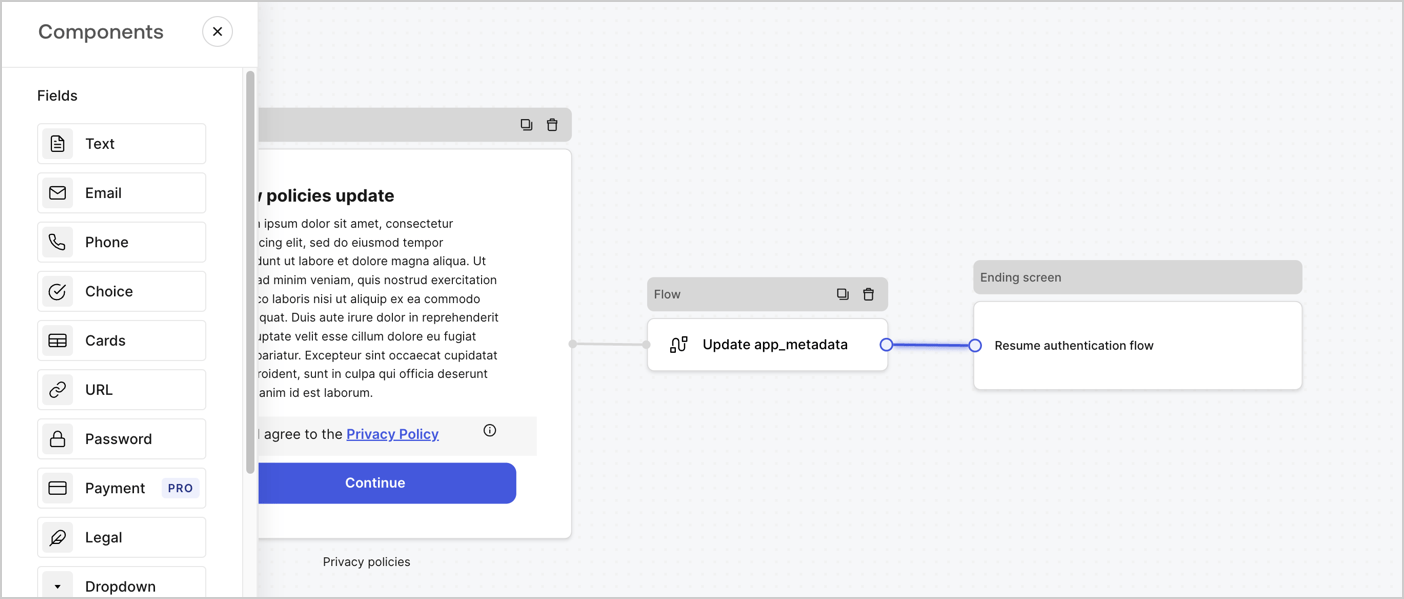
Add a **Flow** node after the **Step** node to update the `app_metadata` and resume the authentication flow by following these steps:

1. Select **Flow** from the bottom of the Form editor.
2. Remove the existing link between the **Step** and **Ending Screen** nodes.
3. Select the new **Flow** > **Click to add a flow** > **Create a new flow.**

   * Enter `Update app_metadata` in the **Name** field.
   * Select **Create**.
   * Select **Save**.
4. Link the **Flow** node to the **Step** and **Ending Screen** nodes as pictured below.
5. Select **Publish** to save.
<Frame>
  <img src="https://mintcdn.com/docs-staging-feat-update-styling-docs-for-universal-compone/CHwbi8BEn2axWgua/docs/images/cdy7uua7fh8z/6YIkzm7SrpM9LW76AXuRzh/353c518fe82bbaa440836da1d83596d6/link-policies.png?fit=max&auto=format&n=CHwbi8BEn2axWgua&q=85&s=58fadcf5b8c8f7bff6f74aec99ef7026" alt="Dashboard > Actions > Forms > Form" data-og-width="1404" width="1404" data-og-height="599" height="599" data-path="docs/images/cdy7uua7fh8z/6YIkzm7SrpM9LW76AXuRzh/353c518fe82bbaa440836da1d83596d6/link-policies.png" data-optimize="true" data-opv="3" srcset="https://mintcdn.com/docs-staging-feat-update-styling-docs-for-universal-compone/CHwbi8BEn2axWgua/docs/images/cdy7uua7fh8z/6YIkzm7SrpM9LW76AXuRzh/353c518fe82bbaa440836da1d83596d6/link-policies.png?w=280&fit=max&auto=format&n=CHwbi8BEn2axWgua&q=85&s=9303443c1fa095f54718d1266d21cf1b 280w, https://mintcdn.com/docs-staging-feat-update-styling-docs-for-universal-compone/CHwbi8BEn2axWgua/docs/images/cdy7uua7fh8z/6YIkzm7SrpM9LW76AXuRzh/353c518fe82bbaa440836da1d83596d6/link-policies.png?w=560&fit=max&auto=format&n=CHwbi8BEn2axWgua&q=85&s=136810cf72fb50f15f4d59588a7bb9bb 560w, https://mintcdn.com/docs-staging-feat-update-styling-docs-for-universal-compone/CHwbi8BEn2axWgua/docs/images/cdy7uua7fh8z/6YIkzm7SrpM9LW76AXuRzh/353c518fe82bbaa440836da1d83596d6/link-policies.png?w=840&fit=max&auto=format&n=CHwbi8BEn2axWgua&q=85&s=bb49a070e99d56a521e72be7f5e75f0b 840w, https://mintcdn.com/docs-staging-feat-update-styling-docs-for-universal-compone/CHwbi8BEn2axWgua/docs/images/cdy7uua7fh8z/6YIkzm7SrpM9LW76AXuRzh/353c518fe82bbaa440836da1d83596d6/link-policies.png?w=1100&fit=max&auto=format&n=CHwbi8BEn2axWgua&q=85&s=642e7599225e09091d0b55e73c480902 1100w, https://mintcdn.com/docs-staging-feat-update-styling-docs-for-universal-compone/CHwbi8BEn2axWgua/docs/images/cdy7uua7fh8z/6YIkzm7SrpM9LW76AXuRzh/353c518fe82bbaa440836da1d83596d6/link-policies.png?w=1650&fit=max&auto=format&n=CHwbi8BEn2axWgua&q=85&s=06c894485d364f1399ab348bbe146636 1650w, https://mintcdn.com/docs-staging-feat-update-styling-docs-for-universal-compone/CHwbi8BEn2axWgua/docs/images/cdy7uua7fh8z/6YIkzm7SrpM9LW76AXuRzh/353c518fe82bbaa440836da1d83596d6/link-policies.png?w=2500&fit=max&auto=format&n=CHwbi8BEn2axWgua&q=85&s=4456349352ed5da28ed1c3c3e36404d9 2500w" />
</Frame>

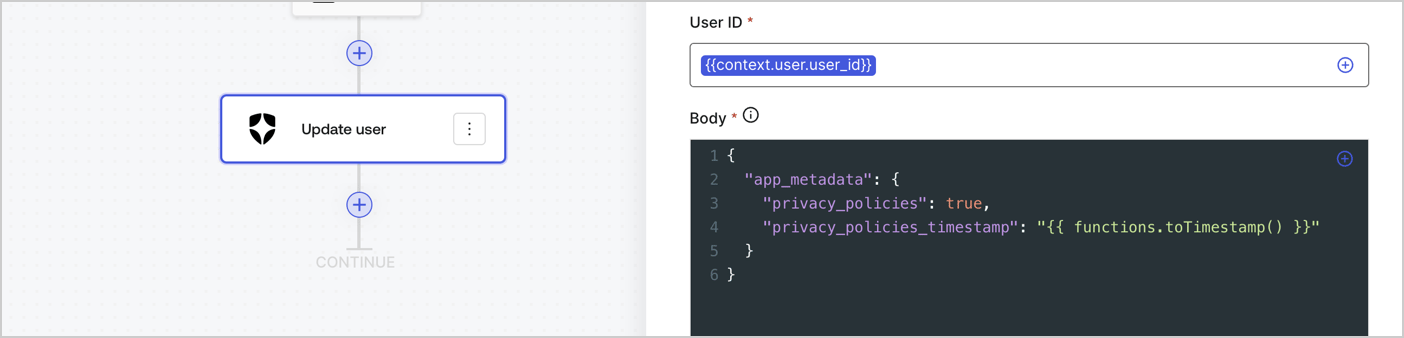
Add an Auth0 Update user action to the flow by following these steps:

1. Select the **Flow** **Update app\_metadata** > **Edit flow** to open the Flow editor in a new tab.
2. Below the StartAction, select the **+** icon to add an **Update user** action. Complete the fields below, then select **Save** to continue.

   * **Connection**: Select from the dropdown the Vault connection to your M2M application.

   * **User ID**: Enter `{{context.user.user_id}}`.

   * **Body**: Copy and paste the following code to update the app\_metadata with the privacy\_policies and privacy\_policies\_timestamp properties.

     ```text lines theme={null}
     {
       "app_metadata": {
         "privacy_policies": true,
         "privacy_policies_timestamp": "{{ functions.toTimestamp() }}"
       }
     }
     ```

   * Select **Save**.
3. Select **Publish** to save.
<Frame>
  <img src="https://mintcdn.com/docs-staging-feat-update-styling-docs-for-universal-compone/vyznlhJMBEcY5snB/docs/images/cdy7uua7fh8z/CvMNIwWrOUwaFW4X3G28p/1fb70ae57a20749d9ffaaba8dc0b7e26/update-user-privacy.png?fit=max&auto=format&n=vyznlhJMBEcY5snB&q=85&s=0d9583a9c0604bce1d7057a6a0a3de1b" alt="Dashboard > Actions > Forms > User case privacy policy code" data-og-width="1404" width="1404" data-og-height="338" height="338" data-path="docs/images/cdy7uua7fh8z/CvMNIwWrOUwaFW4X3G28p/1fb70ae57a20749d9ffaaba8dc0b7e26/update-user-privacy.png" data-optimize="true" data-opv="3" srcset="https://mintcdn.com/docs-staging-feat-update-styling-docs-for-universal-compone/vyznlhJMBEcY5snB/docs/images/cdy7uua7fh8z/CvMNIwWrOUwaFW4X3G28p/1fb70ae57a20749d9ffaaba8dc0b7e26/update-user-privacy.png?w=280&fit=max&auto=format&n=vyznlhJMBEcY5snB&q=85&s=f91891fabe4fb3575f6ed5417b5fb75c 280w, https://mintcdn.com/docs-staging-feat-update-styling-docs-for-universal-compone/vyznlhJMBEcY5snB/docs/images/cdy7uua7fh8z/CvMNIwWrOUwaFW4X3G28p/1fb70ae57a20749d9ffaaba8dc0b7e26/update-user-privacy.png?w=560&fit=max&auto=format&n=vyznlhJMBEcY5snB&q=85&s=d265f85fe34bf1e242f2e23d12c25d79 560w, https://mintcdn.com/docs-staging-feat-update-styling-docs-for-universal-compone/vyznlhJMBEcY5snB/docs/images/cdy7uua7fh8z/CvMNIwWrOUwaFW4X3G28p/1fb70ae57a20749d9ffaaba8dc0b7e26/update-user-privacy.png?w=840&fit=max&auto=format&n=vyznlhJMBEcY5snB&q=85&s=7d9843d2411bf3c2378d0771c5080c64 840w, https://mintcdn.com/docs-staging-feat-update-styling-docs-for-universal-compone/vyznlhJMBEcY5snB/docs/images/cdy7uua7fh8z/CvMNIwWrOUwaFW4X3G28p/1fb70ae57a20749d9ffaaba8dc0b7e26/update-user-privacy.png?w=1100&fit=max&auto=format&n=vyznlhJMBEcY5snB&q=85&s=e5d5d5b5977e29e564b5bfa86faf5efe 1100w, https://mintcdn.com/docs-staging-feat-update-styling-docs-for-universal-compone/vyznlhJMBEcY5snB/docs/images/cdy7uua7fh8z/CvMNIwWrOUwaFW4X3G28p/1fb70ae57a20749d9ffaaba8dc0b7e26/update-user-privacy.png?w=1650&fit=max&auto=format&n=vyznlhJMBEcY5snB&q=85&s=f0179b8d24c76a962720b3753814bf8a 1650w, https://mintcdn.com/docs-staging-feat-update-styling-docs-for-universal-compone/vyznlhJMBEcY5snB/docs/images/cdy7uua7fh8z/CvMNIwWrOUwaFW4X3G28p/1fb70ae57a20749d9ffaaba8dc0b7e26/update-user-privacy.png?w=2500&fit=max&auto=format&n=vyznlhJMBEcY5snB&q=85&s=3ecf26cd2dbdeb448abd41acd40e6c27 2500w" />
</Frame>

<Callout icon="file-lines" color="#0EA5E9" iconType="regular">
  The flow **Update app\_metadata** adds a `privacy_policies true` value to the app`_metadata` object and also generates a timestamp with a [helper function.](/docs/customize/forms/variables)
</Callout>

## Retrieve the form render code

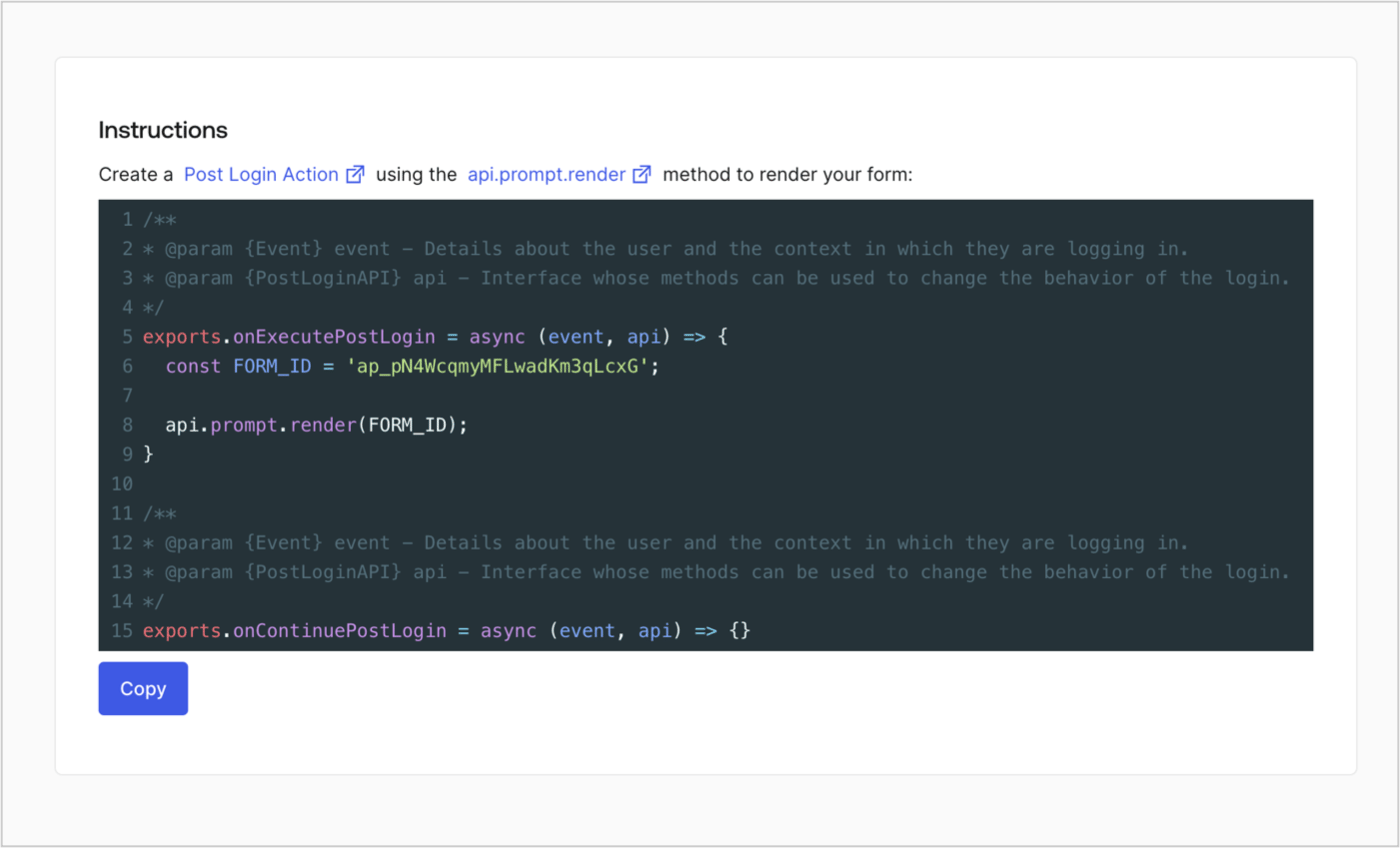
Retrieve your form render code to visually render the form with a custom Post Login Action by following these steps:

* From the Form editor, select **`<> Render`**.
* Select **Copy**.
<Frame>
  <img src="https://mintcdn.com/docs-staging-feat-update-styling-docs-for-universal-compone/KkAWLZH4xeckXiJ7/docs/images/cdy7uua7fh8z/2EIUzc539sq9lwoTKbjoJv/496a864c0fc44a782c9cadca119dbfb0/embed.png?fit=max&auto=format&n=KkAWLZH4xeckXiJ7&q=85&s=304b17585c35f14c8a7121aebbe22288" alt="Dashboard > Actions > Forms > Form > Embed" data-og-width="1400" width="1400" data-og-height="848" height="848" data-path="docs/images/cdy7uua7fh8z/2EIUzc539sq9lwoTKbjoJv/496a864c0fc44a782c9cadca119dbfb0/embed.png" data-optimize="true" data-opv="3" srcset="https://mintcdn.com/docs-staging-feat-update-styling-docs-for-universal-compone/KkAWLZH4xeckXiJ7/docs/images/cdy7uua7fh8z/2EIUzc539sq9lwoTKbjoJv/496a864c0fc44a782c9cadca119dbfb0/embed.png?w=280&fit=max&auto=format&n=KkAWLZH4xeckXiJ7&q=85&s=3b684aaaea654b69911330409b8119f2 280w, https://mintcdn.com/docs-staging-feat-update-styling-docs-for-universal-compone/KkAWLZH4xeckXiJ7/docs/images/cdy7uua7fh8z/2EIUzc539sq9lwoTKbjoJv/496a864c0fc44a782c9cadca119dbfb0/embed.png?w=560&fit=max&auto=format&n=KkAWLZH4xeckXiJ7&q=85&s=f9a3f9f89d1f9298dff72b397325b429 560w, https://mintcdn.com/docs-staging-feat-update-styling-docs-for-universal-compone/KkAWLZH4xeckXiJ7/docs/images/cdy7uua7fh8z/2EIUzc539sq9lwoTKbjoJv/496a864c0fc44a782c9cadca119dbfb0/embed.png?w=840&fit=max&auto=format&n=KkAWLZH4xeckXiJ7&q=85&s=adaf0fdd316c72506b22e16fdb3727f5 840w, https://mintcdn.com/docs-staging-feat-update-styling-docs-for-universal-compone/KkAWLZH4xeckXiJ7/docs/images/cdy7uua7fh8z/2EIUzc539sq9lwoTKbjoJv/496a864c0fc44a782c9cadca119dbfb0/embed.png?w=1100&fit=max&auto=format&n=KkAWLZH4xeckXiJ7&q=85&s=2d5573961364f435bee861ab7fb992d6 1100w, https://mintcdn.com/docs-staging-feat-update-styling-docs-for-universal-compone/KkAWLZH4xeckXiJ7/docs/images/cdy7uua7fh8z/2EIUzc539sq9lwoTKbjoJv/496a864c0fc44a782c9cadca119dbfb0/embed.png?w=1650&fit=max&auto=format&n=KkAWLZH4xeckXiJ7&q=85&s=d09417bcab1a7cdc3368b878cd367bc8 1650w, https://mintcdn.com/docs-staging-feat-update-styling-docs-for-universal-compone/KkAWLZH4xeckXiJ7/docs/images/cdy7uua7fh8z/2EIUzc539sq9lwoTKbjoJv/496a864c0fc44a782c9cadca119dbfb0/embed.png?w=2500&fit=max&auto=format&n=KkAWLZH4xeckXiJ7&q=85&s=dea2998da293c00a821b651fef54bb16 2500w" />
</Frame>

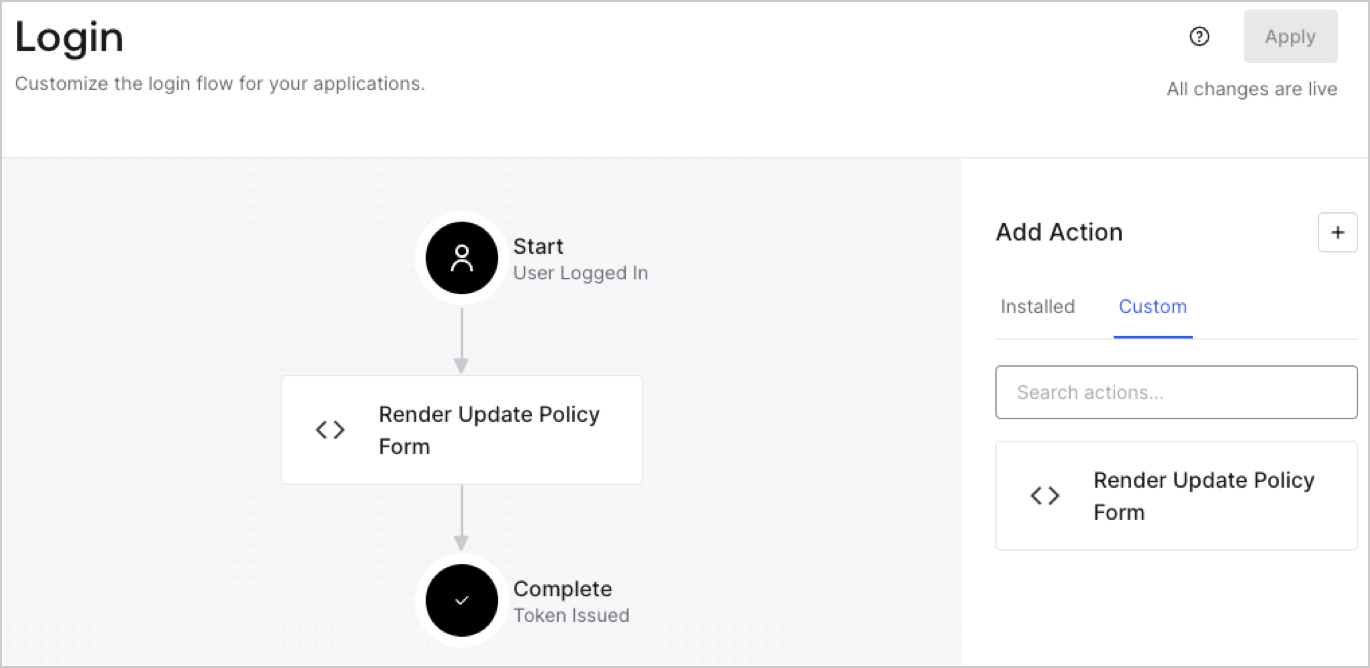
## Create a Post Login Action

Create a post-login Action to render your form by following these steps:

1. Navigate to **Auth0 Dashboard > Actions > Flows > Login.**
2. Select the **+** icon and Select **Build from scratch**:

   * **Name**: Enter `Render Update Policy Form`.
   * **Trigger**: Select `Login / Post Login`.
   * **Runtime**: Select the recommended version.
3. Select **Create**.

To configure the post-login Action:

1. Delete the existing code from the Code editor.
2. Paste the form render code into the Code editor.
3. Edit the code to define the conditional logic that will render the form.

   ```javascript lines theme={null}
   /**
   * @param {Event} event - Details about the user and the context in which they are logging in.
   * @param {PostLoginAPI} api - Interface whose methods can be used to change the behavior of the login.
   */
   exports.onExecutePostLogin = async (event, api) => {
     const FORM_ID = 'REPLACE_WITH_YOUR_FORM_ID';

     if (event.user.app_metadata.privacy_policies !== true) {
       api.prompt.render(FORM_ID);
     }
   }

   exports.onContinuePostLogin = async (event, api) => { }
   ```

   <Callout icon="file-lines" color="#0EA5E9" iconType="regular">
     The example code above will render the form when a user is missing the app metadata `privacy_policies` property.
   </Callout>
4. Select **Deploy.**
5. Drag and Drop the **Render Update Policy Form** Action to the **Login** flow.
   <Frame>
     <img src="https://mintcdn.com/docs-staging-feat-update-styling-docs-for-universal-compone/qsIqsT0TnQQH4J6U/docs/images/cdy7uua7fh8z/5TOwDgevZsBqd7yZynUYWU/41ca909dc3007aed4f40ff794a05efa5/postlogin.png?fit=max&auto=format&n=qsIqsT0TnQQH4J6U&q=85&s=2af090804c17dd7ddb463bb644414e3e" alt="Dashboard > Forms > Use Case > Render update policy form login action" data-og-width="1370" width="1370" data-og-height="668" height="668" data-path="docs/images/cdy7uua7fh8z/5TOwDgevZsBqd7yZynUYWU/41ca909dc3007aed4f40ff794a05efa5/postlogin.png" data-optimize="true" data-opv="3" srcset="https://mintcdn.com/docs-staging-feat-update-styling-docs-for-universal-compone/qsIqsT0TnQQH4J6U/docs/images/cdy7uua7fh8z/5TOwDgevZsBqd7yZynUYWU/41ca909dc3007aed4f40ff794a05efa5/postlogin.png?w=280&fit=max&auto=format&n=qsIqsT0TnQQH4J6U&q=85&s=9bdc61ab696f31d69d289016a7c27a3d 280w, https://mintcdn.com/docs-staging-feat-update-styling-docs-for-universal-compone/qsIqsT0TnQQH4J6U/docs/images/cdy7uua7fh8z/5TOwDgevZsBqd7yZynUYWU/41ca909dc3007aed4f40ff794a05efa5/postlogin.png?w=560&fit=max&auto=format&n=qsIqsT0TnQQH4J6U&q=85&s=7b31457e4d9097cf8fd231ecffae5dfd 560w, https://mintcdn.com/docs-staging-feat-update-styling-docs-for-universal-compone/qsIqsT0TnQQH4J6U/docs/images/cdy7uua7fh8z/5TOwDgevZsBqd7yZynUYWU/41ca909dc3007aed4f40ff794a05efa5/postlogin.png?w=840&fit=max&auto=format&n=qsIqsT0TnQQH4J6U&q=85&s=f21d0ba40eb5fa72e568cbede66fc7d6 840w, https://mintcdn.com/docs-staging-feat-update-styling-docs-for-universal-compone/qsIqsT0TnQQH4J6U/docs/images/cdy7uua7fh8z/5TOwDgevZsBqd7yZynUYWU/41ca909dc3007aed4f40ff794a05efa5/postlogin.png?w=1100&fit=max&auto=format&n=qsIqsT0TnQQH4J6U&q=85&s=dcdd1f1ef711d99837810eff13a6fbf7 1100w, https://mintcdn.com/docs-staging-feat-update-styling-docs-for-universal-compone/qsIqsT0TnQQH4J6U/docs/images/cdy7uua7fh8z/5TOwDgevZsBqd7yZynUYWU/41ca909dc3007aed4f40ff794a05efa5/postlogin.png?w=1650&fit=max&auto=format&n=qsIqsT0TnQQH4J6U&q=85&s=df32c424612c156479310e0cdd744ed1 1650w, https://mintcdn.com/docs-staging-feat-update-styling-docs-for-universal-compone/qsIqsT0TnQQH4J6U/docs/images/cdy7uua7fh8z/5TOwDgevZsBqd7yZynUYWU/41ca909dc3007aed4f40ff794a05efa5/postlogin.png?w=2500&fit=max&auto=format&n=qsIqsT0TnQQH4J6U&q=85&s=85fceabfcf21d51bd808a05368fb7c58 2500w" />
   </Frame>
6. Select **Apply.**

### Test implementation

Test the implementation by following these steps:

1. Log in with an existing user whose app`_metadata` attribute `privacy_policies` does not have a value.
2. The post-login Action in the Login flow will render the form and prompt for acceptance.
3. Select **Auth0 Dashboard > User Management > Users,** locate the user and verify that the `app_metadata` attribute `privacy_policies` contains a `true` value and a timestamp.
